Selenium, Puppeteer and Cypress
Retrospective Note
This article was written in February 2021. Back then I worked as a QA consultant in Thoughtworks China. This article was written in Chinese and shared with Chinese Thoughtworkers.
Five years past, I have changed some of my thoughts, especially my judgement about Playwright, but I still want to translate it into English and keep it here as a record.
I hope the main part of this post remains valuable if you would like to deep dive into the architectural design of those automated testing tools.
As a QA in the recent two years, I have seen the changing landscape of the UI automation test tools. Not long ago, testcafe was still trendy, and soon it seems to become a thing of the past. Recently Microsoft just launched a new tool playwright. My company Thoughtworks also released taiko + gauge. However, after some research, I figure all of those changing tools are fundamentally identical. Amongst all of them, in general there are three categories: Web Driver, Browser Debugging Protocol, and JavaScript Injection. Based on this classification, I will analyse their difference in the rest of this post.
1. Selenium
Note: After many years of development, Selenium WebDriver has significantly diverged from the early Selenium RC in terms of how it works. Here when we mention Selenium, we refer to the current Selenium WebDriver.
Before talking about Selenium, we need to understand two concepts: Selenium, and WebDriver. Selenium is a testing tool, and WebDriver is a browser standard.
Selenium WebDriver implements WebDriver protocol. The drivers provided by every browser manufacturer also implement WebDriver protocol; therefore, Selenium test code is able to talk to a browser driver. To be specific, the testing process based on WebDriver is like this: Selenium test code sends request to browser driver; the driver operates browser once the request is received, and eventually the operation result is sent back to the Selenium test code.
flowchart LR
    Selenium[Selenium] <-->|HTTP request\n based on WebDriver protocol| Driver(Browser Driver)
    Driver <-->|Designed by browser manufacturers thenselves| Browser[Browser]
By reading the source code of Selenium, we can see that core capabilities of Selenium is supported by RemoteWebDriver and DriverCommandExecutor classes. Such ChromeDriver classes that we always use are all inherited from RemoteWebDriver.
Then let’s have a look at this RemoteWebDriver class. From its constructor, we know that it requires a CommandExecutor and a Capabilities.
Capabilities can easily be understood as the basic attributes of a browser (such as name, version). Here let’s focus on CommandExecutor.
|
|
The actual invocation of this CommandExecutor is in startSession (line 14). We can also see that the most relevant method when we create an RemoteWebDriver instance is startSession.
Now let’s look at this startSession method.
|
|
|
|
From here we can see that startSession method essentially just uses executor to execute a DriverComamnd.NEW_SESSION(capabilities) command, where DriverCommand is an encapsulation of WebDriver protocol, and CommandExecutor is responsible of executing the specific WebDriver Command. If we trace back this executor, we can see that it is inherited from HttpCommandExecutor class. This class essentially just sends HTTP requests. Let’s have a look at the comment of execute method in DriverCommandExecutor.
|
|
So basically this method simply sends HTTP request to browser driver. If the request is the creation or deletion of the session, it results in the driver launch or close.
In this sense, isn’t Selenium just a wrapper of API invocation based on WebDriver protocol? To validate this, here is an experiment. I launched a Chrome driver, and sent some HTTP requests based on WebDriver protocol via Postman (no Selenium involved at all), and I actually achieved the whole flow of “Open browser -> Visit Google -> Search Selenium -> Assert that www.selenium.dev exists -> Close browser”.
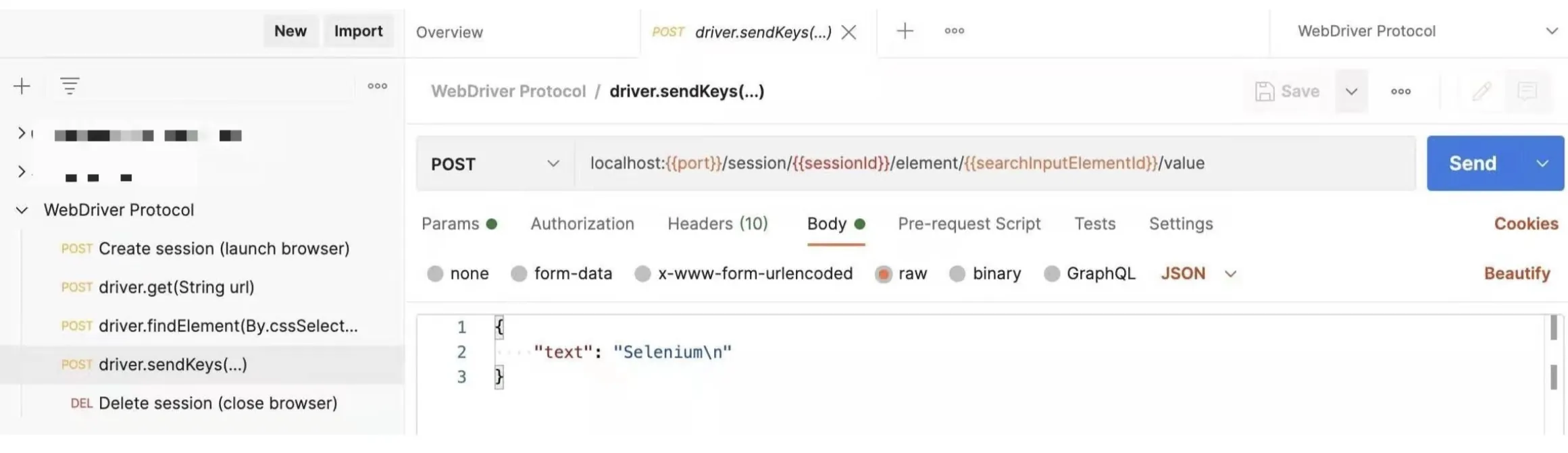
At this point I can’t help being confused. Since it’s possible to operate a browser driver directly, what is the meaning of having Selenium? After more thoughts, I think its value comes from three major aspects:
- WebDriver API request is hard to construct. It is theoretically possible to directly call WebDriver API, but in reality it is not practical. Selenium is a wrapper to make this easy;
- The
RemoteWebDrivercreated by Selenium creates another possibility that theRemoteWebDriverit interacts to can be something other than a real browser driver. Instead, it can be a proxy to many drivers. Based on this, one test can be executed on multiple browsers, or one test suite can be sent to many different drivers for parallel execution. This is actually how Selenium Grid works; - From a testing perspective, Selenium brings better support for testing requirements (for example, wait). By the way, another API-focus testing tool
karatealso supports UI test via WebDriver. At first I was rather surprised. Now after figuring out how WebDriver works, the myth is now totally cleared.
2. Puppeteer
Puppeteer is a tool developed by Google to automate operation on Chromium browsers. In fact, it is rather an automation tool than a testing tool.
Probably many of us have experience with Puppeteer, but I am not sure how many us know the thing that powers Puppeteer, Chrome DevTools Protocol.
Earlier in the WebDriver section, we mentioned that the communication between browser driver and the browser is defined by the browser manufacturer itself. The communication for that on Chromium browsers is exactly CDP (Chrome DevTools Protocol). Another common scenario where CDP is used is the DevTools of Chromium browsers. For example, when we run some JavaScript code in the DevTools console, and we see the outcome in real time. The protocol which makes this happen behind the scene is also CDP. Apart from basic automation and script execution, CDP also brings a basket of advanced features, such as performance monitor, network request debugging, etc.
So the automation based on CDP is pretty simple. The automation code directly talks to browser via CDP. There is no driver in the middle.
flowchart LR
    Code[Automation Test Code] <-->|WebSocket message in \nChrome DevTools Protocol| Chromium[Chromium Broswer]
CDP is not complicated either. We can explore its way of working like this:
First, let’s start Chrome with this flag --remote-debugging-port
|
|
Next, let’s visit http://localhost:9222/json/list. From there we can get a WebSocket debugging link for Page` element.
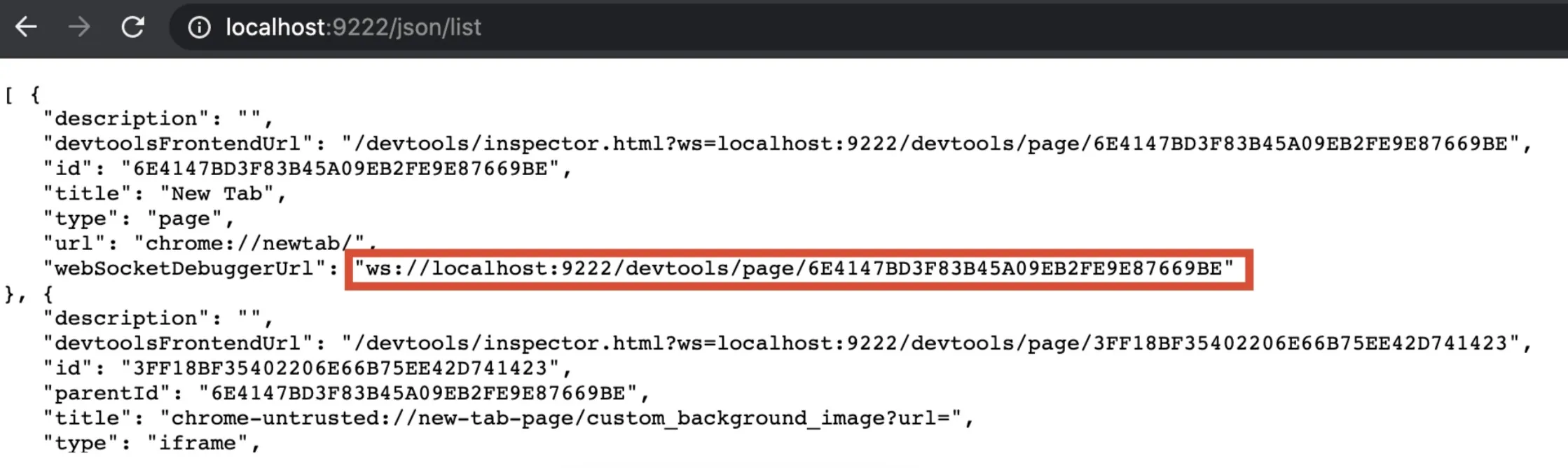
After this, we can use any WebSocket debugging tool (such as Hoppscotch) to connect, and send a message to let Chrome visit the home page of Google.
Note: by the time of the translation, Postman has supported WebSocket. By the time that this post was originally written, it wasn’t supported
According to CDP, that message should look like this:
|
|
After the message is delivered, Chrome will respond the message has been well received, and it will navigate to Google homepage as instructed.
This is a simple example of using CDP to control Chromium browser. From this, we can see that the value of Puppeteer is to provide an advanced encapsulation of CDP API, so that people can easily interact with Chromium browser via CDP.
In the same time, as CDP is the native language of the browser. Some time can be saved in the network request on the driver layer. As a result, tools based on CDP is generally considered as more advantaged in terms of runtime speed. Puppeteer, taiko, and Playwright are all on this side.
However, this type also comes with an obvious drawback. As CDP is specific for Chromium browsers, if we want to test multiple different browsers, CDP is naturally not the answer. But this issue is not a dead end. For example, Mozilla has their own Firefox Remote Debugging Protocol, and it is partially compatible with CDP.
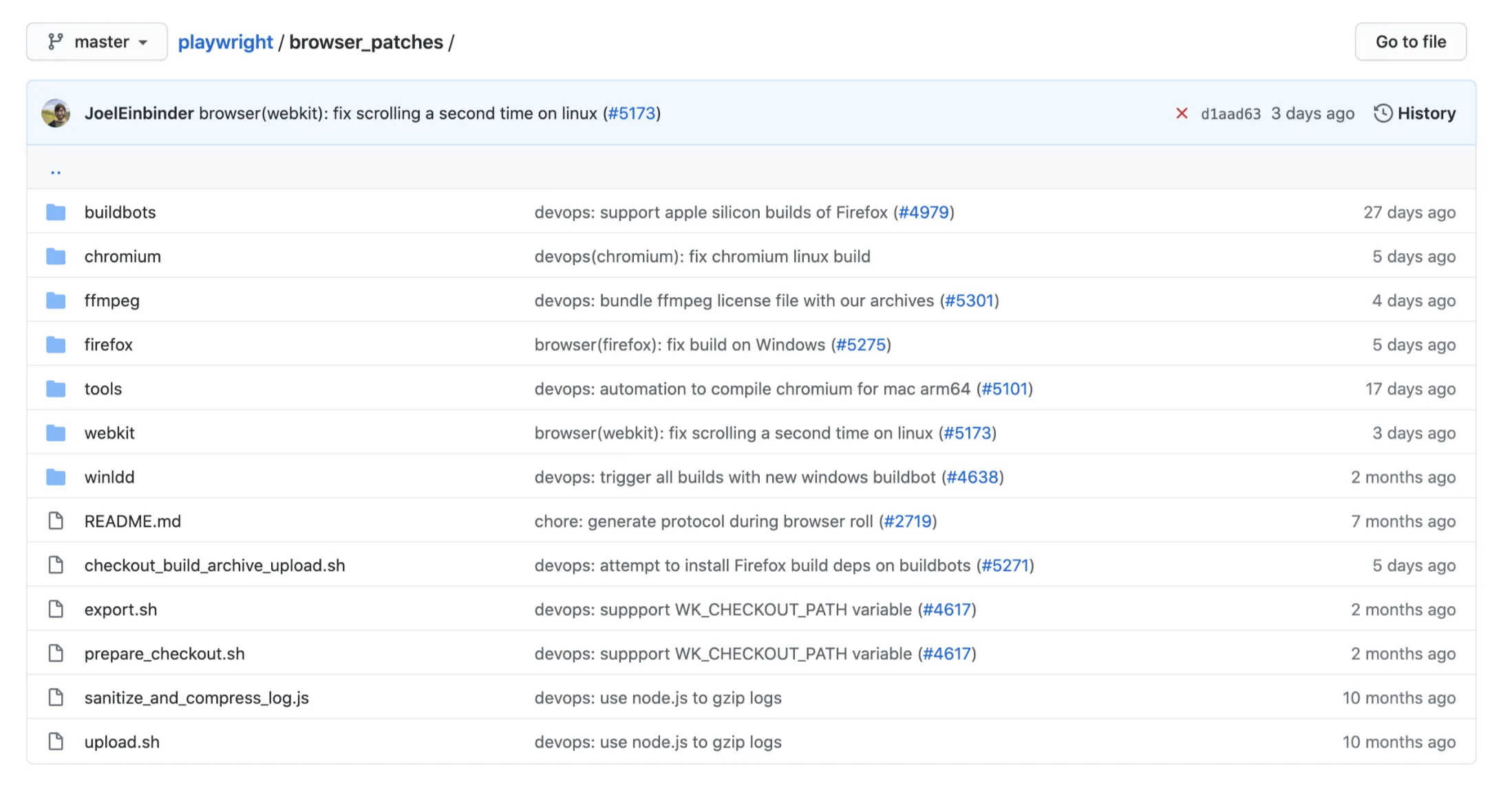
Playwright is a weirdo on this track. It uses browser’s native protocol, and it aims to support multiple browsers, hence it implements all major browser protocols. Since the capabilities of those protocols are not fully same, it again creates a number of browser patches, so as to provide consistent cross-browser compatibility (this is why Playwright must install its own browser).
Back to Puppeteer, this section used it as the starter to explored a different automation approach where WebDriver is not needed. I think this approach comes with a few advantages:
- Faster than WebDriver;
- In most browsers, their native protocol provides more and better capabilities (such as network debugging and performance metrics).
However, the disadvantage of this approach is also obvious:
- Since there is no standard between browsers, as a testing tool it’s hard to provide consistent capabilities, or it cannot provide native support for all browsers.
3. Cypress
Have you ever thought that most UI automation actions, such as clicking an element, pressing a key, and doing assertions on DOM elements, do not actually need an interface from the browser. You can achieve the same thing simply by running JavaScript code in the console.
For example, to click a button whose ID is login, you can simply run this:
|
|
This is the approach of Cypress.
block-beta
    columns 6

    TC["Test code"]:1

    space

    CY["Cypress"]:1

    space:2

    block:BrowserGroup:1
        Browser["Browser"] style Browser fill:transparent,stroke:none
        columns 1
        I1["Iframe 1: Test code"]

        space:2


        I2["Iframe 2: Application"]
    end

    TC-- "1. Start Cypress" --> CY
    CY-- "2. Launch browser, set proxy to Cypress" --> BrowserGroup
    CY-- "3. Package and inject test code" --> I1
    CY-- "4. Visit the application" --> I2
    I1<-- "5. Run tests" --> I2
Cypress is a bit more complicated, but the core of its operation is step 3 and 5 on above image. When Cypress starts, it bundles the user testing script and its own JavaScript library together, and injects it into browser. Later when the scripts get triggered, it runs inside the Browser runtime itself.
This approach is fundamentally different from WebDriver or browser debugging protocols. Here are its advantages:
- Not to pass any protocol. The test runs inside the browser. Theoretically it should be very fast;
- The standard of JavaScript is well established. Compared to browser debugging protocol, Cypress has better cross-browser compatibility;
- More elegant wait by using
await
Interestingly, before Selenium stepped into the era of Selenium WebDriver, there was an older version called Selenium RC, which adopted basically the same approach. According to the Selenium history from its official website, Selenium RC originates an internal project in Thoughtworks
Interestingly, before Selenium stepped into the era of Selenium WebDriver, there was an older version called Selenium RC, which adopted basically the same approach. According to the Selenium history from its official website, Selenium RC originates the testing requirements for our old internal timesheet system (Time and Expense). That testing tool was initially named JavaScriptTestRunner. From the name we can even guess, this tool is powered by JavaScript. Later this tool won the favour of many people, so more and more people joined and contributed. The language binding for other programming language was added by then. Because of this, there was the first ever Selenium, Selenium RC. So the very early version of Selenium actually uses this kind of JavaScript injection approach. That’s why even now we can still see the sizzle.js (a CSS selector engine of JQuery) from 11 years ago.
Then what made Selenium project abandoned this approach, and moved to WebDriver? From the discussion that I have seen, the major reason was around the design issue of Selenium RC itself (for example, API definition wasn’t clear; performance was actually worse than Selenium WebDriver). So once again when the same old approach shines again in Cypress, it really demonstrate that the history moves in an upwards spiral.
Of course, the core of Cypress is JavaScript injection, but it also combines the capabilities of CDP and other browser protocols. When needed, it also operates the browser via its native protocol. For that part I haven’t looked into it more deeply. Cannot comment on its experience.
4. Conclusion
This article explores three common approaches used by the UI automation testing tools.
Comparatively, I personally like tools of WebDriver approach and Cypress better. They serves their own scenarios very well. If there are special testing scenarios where we need to switch browser tabs, WebDriver is probably the way to go, as JavaScript injection is more suitable for single page, so Cypress will inevitably need to introduce CDP or similar protocols, which makes it more complicated; whereas WebDriver from its design is to operate browser, and it natively supports tab switch.
When there are a lot of test cases, and parallel execution or compatibility across multiple browsers are needed, I would also choose Selenium Web Driver. Although Cypress also supports parallel execution, it is a commercial closed source feature. Selenium Grid provides the same powerful and flexible orchestration capability.
For deliveries in smaller scale, when we need more usable, user journey focused tests, and do not need to consider regression in large scale, I would choose Cypress. Because Cypress doesn’t need us to manage driver, doesn’t recommend Page Object Model (they recommend Application Actions pattern), and it handles wait and mock more elegantly, and most importantly, it provides a powerful playback feature, all of these enables us focusing on the application to be tested much easier.
As for Puppeteer, it is not really a testing tool by itself. Combing it with some unit testing framework (such as mocha) and assertion tools (such as chai), it can be used as a testing tool. However, considering its constraint of Chromium only, the advantage of its velocity doesn’t outweigh its disadvantage. As a result, I personally think it’s less useful in most testing scenarios.
As for Playwright, although it fixes the cross-browser issues by introducing browser patches, I can’t find a standing point to choose it over Selenium WebDriver. If I would like standardisation, I might just go with WebDriver; if I would like customisation, I might go with Cypress. So from the technical point of view, the standpoint of Playwright is a bit embarrassing.
However, among tools of this kind of browser debugging protocol, there is one that I think stands out. That is taiko developed by my employer Thoughtworks. Basically taiko provides a Read-Eval-Print Loop testing environment, where you can see the execution result in real time as you write the code. You are also able to record code via this interactive command line style (more on taiko official site ). Another highlight of taiko is its integration with another Thoughtworks BDD (Behaviour Driven Design) tool gauge. If we want to incorporate BDD in test, taiko+gauge as a whole is not a bad choice.
This post exhibits some learnings of myself in the past 2 years. If you are like me in the past, just know how to use these tools but have no idea how they works, I hope this post is helpful.
References
- W3C WebDriver Protocol
- The W3C WebDriver Spec: A Simplified Guide (Unofficial WebDriver Protocol Summary
- Chrome DevTools Protocol
- Firefox Remote Debugging Protocol
- Cypress Documentation:Architecture
- Stack Overflow: Obvious reason to move from Selenium RC to Webdriver.?
- Cypress Documentation:Trade-offs